
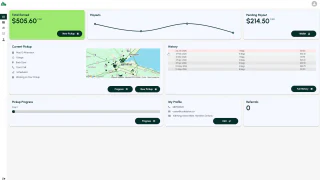
Depot Dash — booking and customer accounts
Customers can book bottle pickups, view past and upcoming pickups, check balances and request payouts. Separate staff tools support routes, assignments and the work behind each pickup.
View case studyServices
Private tools for your customers and staff
Codebytes provides custom customer portal development for businesses that want customers to sign in, view information and complete tasks. Staff can use connected admin tools to manage requests and records. Most portals open in a web browser, while staff tools can also run as installed software.
Questions about custom customer portal developmentCustomers can sign in to submit a request, book a service, upload documents or check progress. Their account can keep previous orders and contact details together, making it easier to use your business again without starting from a blank form.
An admin portal is the staff side of the service. Authorized staff can review requests, update customer records, manage appointments and respond to questions. A manager can see work that needs attention and decide what should happen next.
A web portal opens through a browser on a computer, phone or tablet. For people working at a dedicated computer or workstation, we can also build a desktop application that accesses the same records. The business can use both, with customers signing in online and staff using installed software. We choose the approach around the tasks, devices and equipment people use.
Customers, staff and business partners need access to different records and tasks. We plan how each person signs in, which information they can see and what they can change. For example, a customer could review their order while staff also see the internal notes used to fulfil it.
Codebytes can connect the portal to supported customer-management, scheduling, accounting and payment systems. A request submitted online can be available to staff in the tools they use to manage it. We check the existing software and agree which information should be shared before building the connection.
Often, yes. It can be added to the website or provided as a separate sign-in area linked from it. We review your existing site, accounts and software before recommending how they should connect.
Yes. Customer access is restricted to the records they are allowed to use. We plan and test those restrictions, including any shared access needed by people from the same customer business. Staff permissions are set separately.
Yes. A web portal can work through a browser on phones, tablets and computers. Forms, documents and other tasks are designed for the screens people will use, so they do not need to install an app just to sign in.
Customers can book bottle pickups, view past and upcoming pickups, check balances and request payouts. Separate staff tools support routes, assignments and the work behind each pickup.
View case studyTell me what people should be able to see and do when they sign in. I can help you plan the portal and how it will work with your existing website and software.